Band view
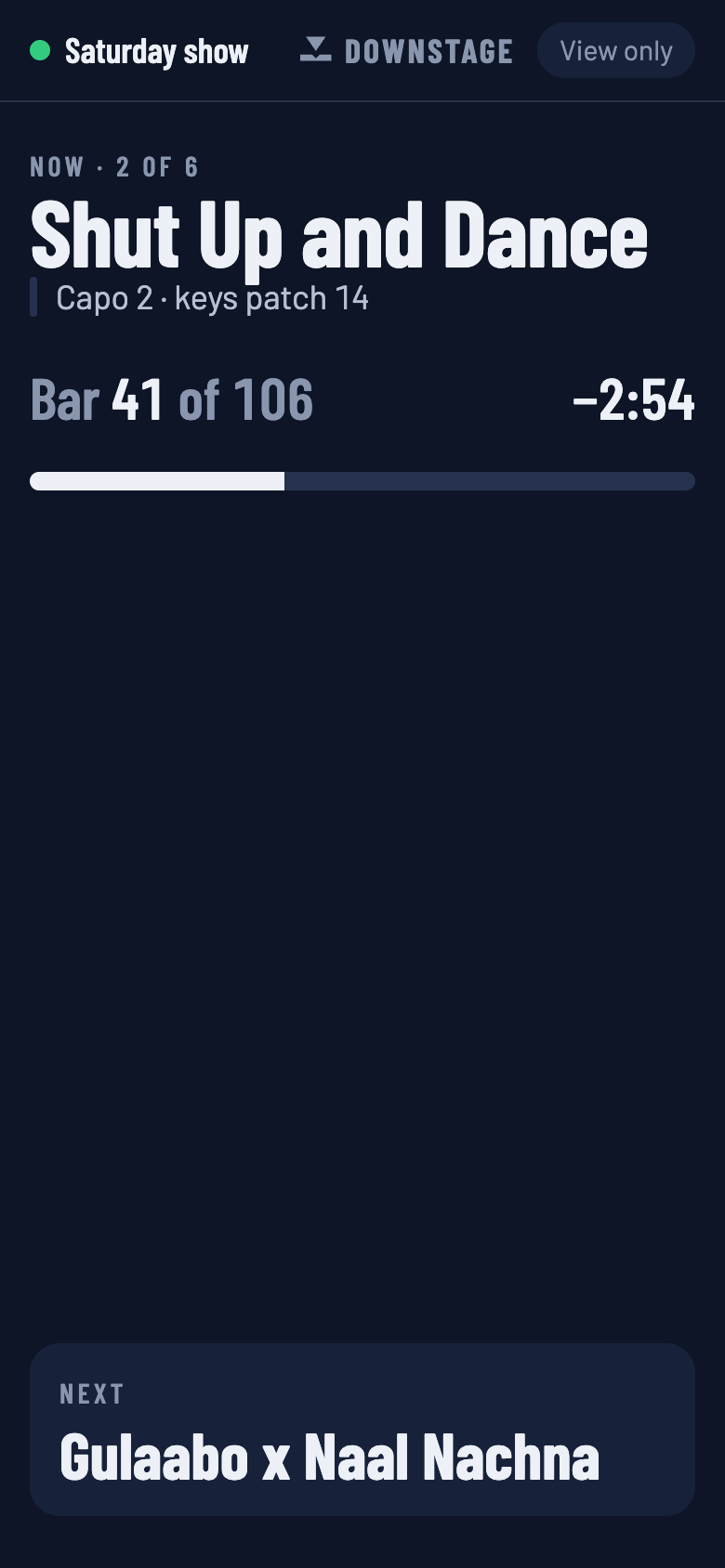
A view-only screen for everyone else on stage — what is playing, how long is left, and what is next.
Downstage 0.9.0 · updated 13 Oct 2026The band view is the show on a phone, for the people who are not driving it. It answers the questions a drummer or a bass player actually has between songs: what are we on, how long have I got, what's next?
Open it
On any phone or tablet on the same network as the laptop, open:
http://downstage.local/band.htmlIf the name does not work on that network, use the laptop's numeric address with /band.html on
the end. The Downstage icon in the Mac's menu bar lists the addresses. Adding the page to the
phone's home screen makes it open full screen.
What it shows
- The song that is playing, and where it is in the set: Now · 2 of 6.
- The song's note, if it has one — Capo 2 · keys patch 14.
- The bar, and a countdown of how long is left in the song.
- What is next. When a jump has been armed, this card turns amber the moment it is — so the band sees a change of plan at the same time as the person who made it.
It follows whichever setlist is on stage, and updates as the show does. If the connection drops it says so, and reconnects by itself.
It cannot change anything
There is nothing to tap. The page is built without any of the code that sends commands to Live, so a phone in a pocket cannot stop the show, however it gets pressed.
That makes it the right thing to hand out freely. Give the controller address,
http://downstage.local, only to the people who should be able to drive.
If a passcode is set, band-view devices are asked for it once, like any other device. The passcode decides who can connect at all; the band view decides what a connected device can do.