Lock
Stop a stray tap from jumping the song, while the transport keeps working.
Downstage 0.9.0 · updated 13 Oct 2026Lock makes the screen ignore the taps that would move the show somewhere else. It is for the moments when your hand is near the iPad for another reason — above all in Split View, when the hand that turns a chart page is the same one that could tap a song.
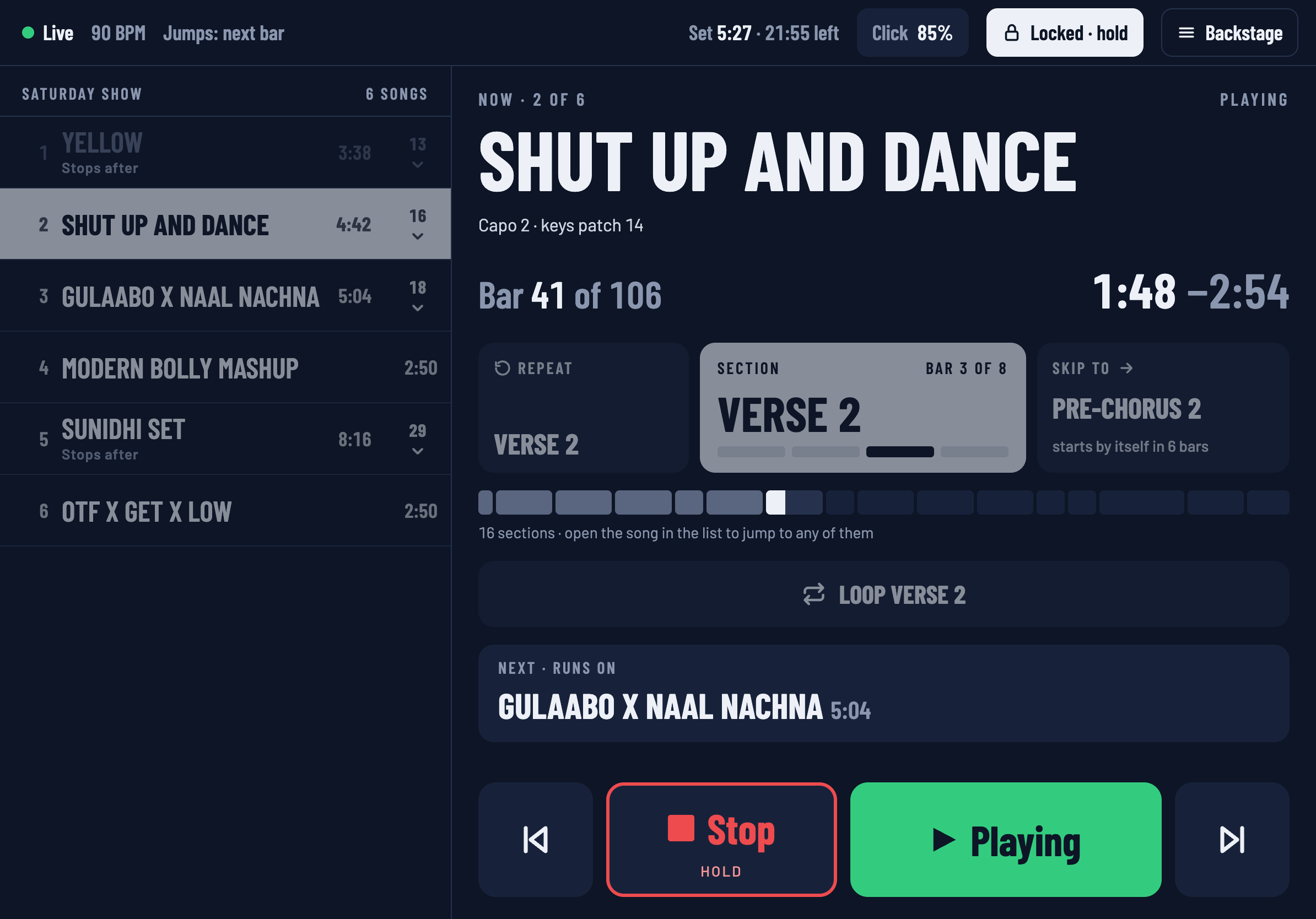
Locking
Tap Lock at the top of the screen. One tap, no confirmation.
The button fills and reads Locked · hold. Everything that is now ignoring you is drawn dimmed:
- the setlist, and the sections inside it,
- the Repeat and Skip to tiles,
- Loop.
What still works
The transport. Stop, Play, Previous and Next all work while the screen is locked. Stop still needs its hold while Live is playing. You can always stop the show.
Backstage and the Click button also still open.
Unlocking
Hold the Lock button for a little over half a second. A tap does not unlock it — otherwise the stray tap that Lock exists to stop would undo it.
Per device
Lock belongs to the device you set it on, and that device remembers it. Locking the iPad does nothing to the laptop or to anyone else's phone.
Lock is not the passcode. Lock keeps your own hands out, on one device. The passcode keeps other people's devices out of the show altogether.